What's inside
Montage Engine is a hosted studio for slideshow carousels — the swipeable, photo-mode posts that do a lot of the work on TikTok and Instagram. This page is the long version of what you get for $5 a month.
Your workspace
Signing up creates a private workspace that belongs to you. Projects, themes, images, decks, and your TikTok connection all live inside it, and nobody else on Montage Engine can see any of it. Everything below happens in your workspace.
One subscription, one workspace, as many projects as you want inside it — a project per account or per client, whichever way you work.
The board
Each project holds a written context — who the account is for, what it sounds like, what it's about — and a board of ideas. Cards move through three lanes:
- Ideas — a premise and a working title. Add them yourself or generate a batch and keep the good ones.
- Slides — the idea has a script and a rendered deck you can edit, re-render, and re-theme.
- Done — the carousel is finished, sent, or posted; if it's been posted, the card carries its view count.
Clone a card to make a variant, drag between lanes, and pull new ideas out of a deck that worked.
The slide editor
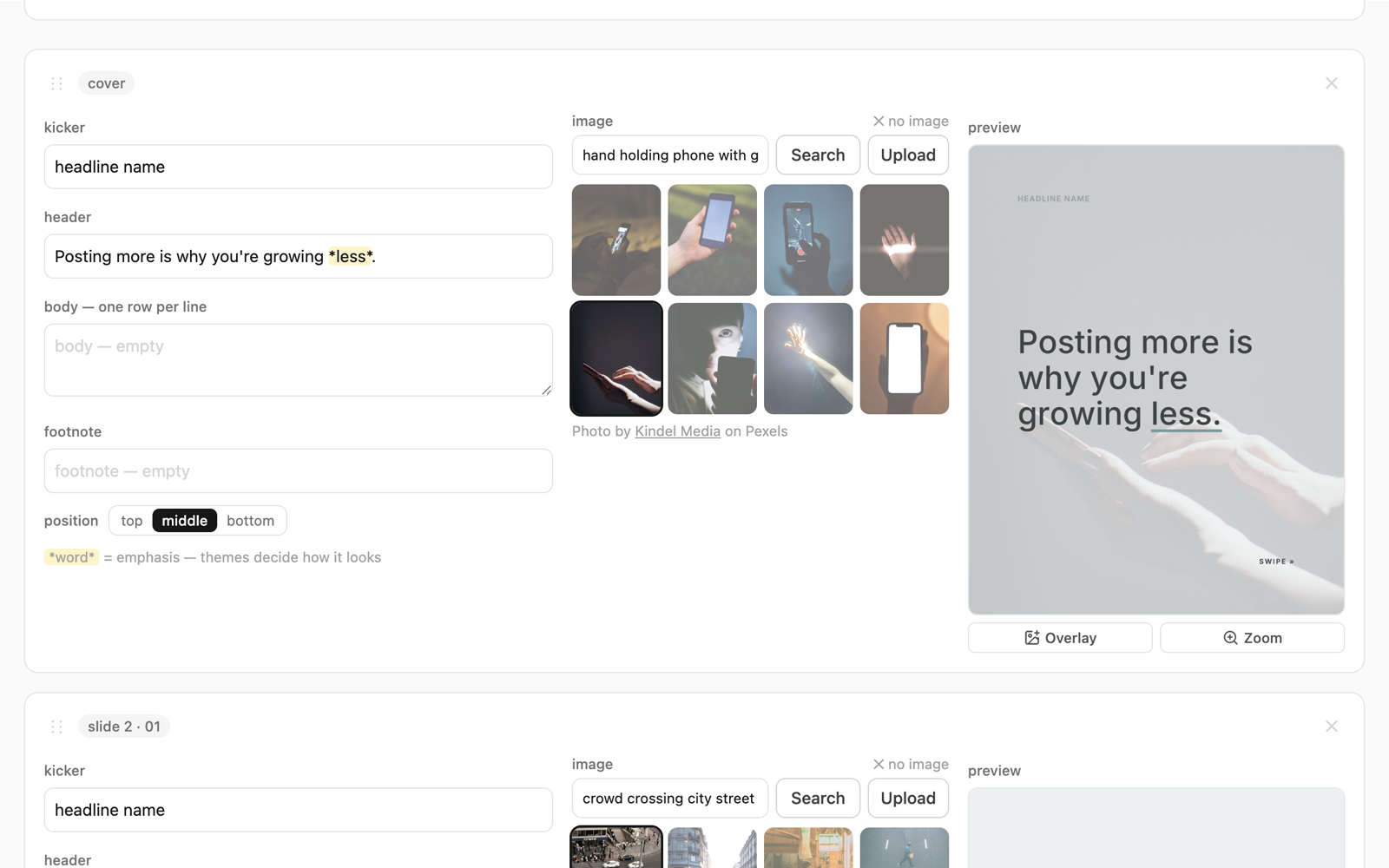
A carousel is a stack of slides and the editor is one card per slide — no markdown, no JSON, nothing to learn. Per slide you control:
| Kicker | The small line above the headline — a section label, a number, a category. |
|---|---|
| Header | The headline. The line people actually read while swiping. |
| Body | The supporting sentence or two. |
| Footnote | A small line at the bottom — a source, a caveat, a credit. |
| Image | The full-bleed photograph behind the text — searched from Pexels or uploaded for that slide. |
| Position | Where the text block sits on the slide. |
| Overlays | Up to eight images from your library placed on top, each with its own position, size, rotation, and opacity. |
There's a master row above the stack for the things that apply deck-wide: a common kicker, page numbers, the theme, and a deck-wide background. Add, delete, and reorder slides freely.
Every field autosaves as you type. Rewriting a slide's text, swapping its photo, or moving an overlay redraws just that slide, so ordinary editing is quick. Changes made in the master row, and adding, deleting or reordering slides, rebuild the whole deck — they move other slides' pixels too.
Theme studio
A theme is a complete visual identity: typefaces and their sizes, colour, spacing, alignment, page-number treatment, and the rules for how text stays legible over photography. Point a deck at a theme and every slide obeys it.
You can build a theme three ways:
- Describe it — write what you want in plain language and get a theme back.
- From a post — paste an Instagram or TikTok post link and borrow its look. Handy when it works; screenshots are the reliable route.
- From screenshots — upload images of a style you admire and get a theme in that spirit.
The app also ships with a library of ready-made themes, so you don't have to design anything to get started — pick one and point a deck at it.
Themes are reusable across every deck in your workspace, and swapping a deck's theme re-renders it end to end. That means a redesign is one dropdown, not an afternoon.
Image library, overlays, and background removal
Every workspace has an image library. Upload your own artwork and photography, or save picks from Pexels — either way the file is copied into your workspace rather than linked, so an image you used in March still renders in September even if the original URL has rotted.
Library images are placed on slides as overlays: drag, resize, rotate, and fade them, stacked up to eight deep per slide. That's enough for a product shot, a cut-out subject, an arrow, and a mark of your own. (The full-bleed photograph behind the text is chosen separately, per slide, from Pexels or an upload.)
Background removal is built in: one click on any library image produces a clean cut-out and replaces the image in your library. Because slides reference the library image rather than a copy of it, every deck using that image picks the cut-out up the next time it renders — no round trip through another tool, no re-placing it by hand.
Rendering
Slides render on our servers, not in your browser, so a big deck doesn't tie up your laptop.
| Output | 1080 × 1350 PNG — the 4:5 portrait frame TikTok photo mode and Instagram both want. |
|---|---|
| Speed | Seconds per slide; rewriting one slide redraws only that slide. |
| Progress | Live in the app — you can keep working while a deck builds. |
| Export | Download any deck as a zip of PNGs numbered in order, with the deck's own definition file alongside them. |
Because the output is plain image files, a carousel you built here is usable anywhere that takes portrait images — the TikTok integration is a convenience, not a lock-in.
TikTok publishing
Connect your TikTok account from your workspace settings with TikTok's own login screen. You grant the permissions, you see exactly which account is connected, and you can disconnect at any time.
Once connected, sending a finished carousel takes one click. We use TikTok's official Content Posting API in draft mode: the slides are delivered to your TikTok inbox with your title and caption pre-filled and your chosen cover slide, and TikTok notifies you that a draft is waiting. You open the TikTok app, pick your sound, adjust anything you like, and post it yourself.
To be unambiguous about it: Montage Engine cannot publish to your profile. There is no path in the product that posts on your behalf. Everything reaches TikTok as a draft that only you can publish.
One detail worth knowing: the copy we send is re-rendered with the connected account's own @handle added, so a carousel that gets reposted still points back at you. Where it appears depends on the theme — always on the cover, and on the rest of the slides for themes that carry a footer line. Your stored deck, the editor previews, and the download zip are never stamped; only the outgoing copy is, and it's a checkbox you can clear in the send dialog. Nothing else is added: no Montage Engine name, logo, link, or promotional text goes onto anything you make.
Disconnecting revokes our access tokens with TikTok and deletes the TikTok data we hold for that account — the connection, the post records, and the metrics history — while leaving the rest of your workspace untouched.
Analytics
When you connect an account we read its posting history through TikTok's Display API and keep it fresh on a schedule. That gives you:
- An account trend — followers over time, with every post marked on the timeline so you can see what moved the line.
- Per-post view curves — views snapshotted over time rather than a single lifetime number, so you can see how a post actually accumulated.
- A normalised overlay — compare posts on days-since-posted instead of calendar time, which is the only fair way to ask which one grew faster.
- Current engagement — views, likes, comments, and shares per post in the table, alongside the deck that made it.
- Deck linking — published posts match back to the deck that produced them automatically, or you can link them by hand.
TikTok's API doesn't expose profile views to anyone, so if you want that series you can import the CSV that TikTok Studio exports and it'll chart alongside your follower trend.
Assisted drafting
Montage Engine builds a deck for you to edit rather than starting you at a blank canvas. Pressing Generate on an idea runs the chain in one go: the premise becomes a slide-by-slide script, each beat gets a photo query resolved against Pexels, and the whole thing is composed against a theme and rendered. What lands on your screen is a finished draft in the editor.
The same machinery powers generating a batch of idea angles, pulling fresh ideas out of a deck that worked, and generating a theme from a description, a link, or screenshots.
You'll need to connect an AI account. These steps run on your own OpenRouter account, connected in one click, and generating a deck is how decks get made here — so it's a setup step, not an optional extra. You pick the models, pay the providers directly at cost, and cap your spend on OpenRouter's side. We never mark up tokens, and we don't use your content to train anything.
After the draft exists, none of it is locked: rewrite every line, swap every photo, add and delete slides, change the theme. Most of the work in this product is editing, which is why the editor is the part we've spent the most time on.
You are the publisher. Review what goes out, make it yours, and label AI-assisted content where the platform asks you to — TikTok has its own rules about that, and they apply to the post you publish.
Your data
| Export | One click in Settings downloads a zip of every record and every rendered slide your workspace owns. |
|---|---|
| Deletion | One click deletes the workspace, the files, the TikTok connection, the subscription, and your login. |
| Encryption | Credentials that could act on your behalf — TikTok tokens, your OpenRouter key — are encrypted at rest. |
| After cancelling | Your workspace stays viewable and exportable for 30 days, then it's permanently deleted. |
The full detail is in the Privacy Policy and the Terms of Service.